Weather Alerts: Radar Tracker
- 4.2
- Rating
- 10.00K
- Installs
- Free
- Price
 Analysis by App-foxy
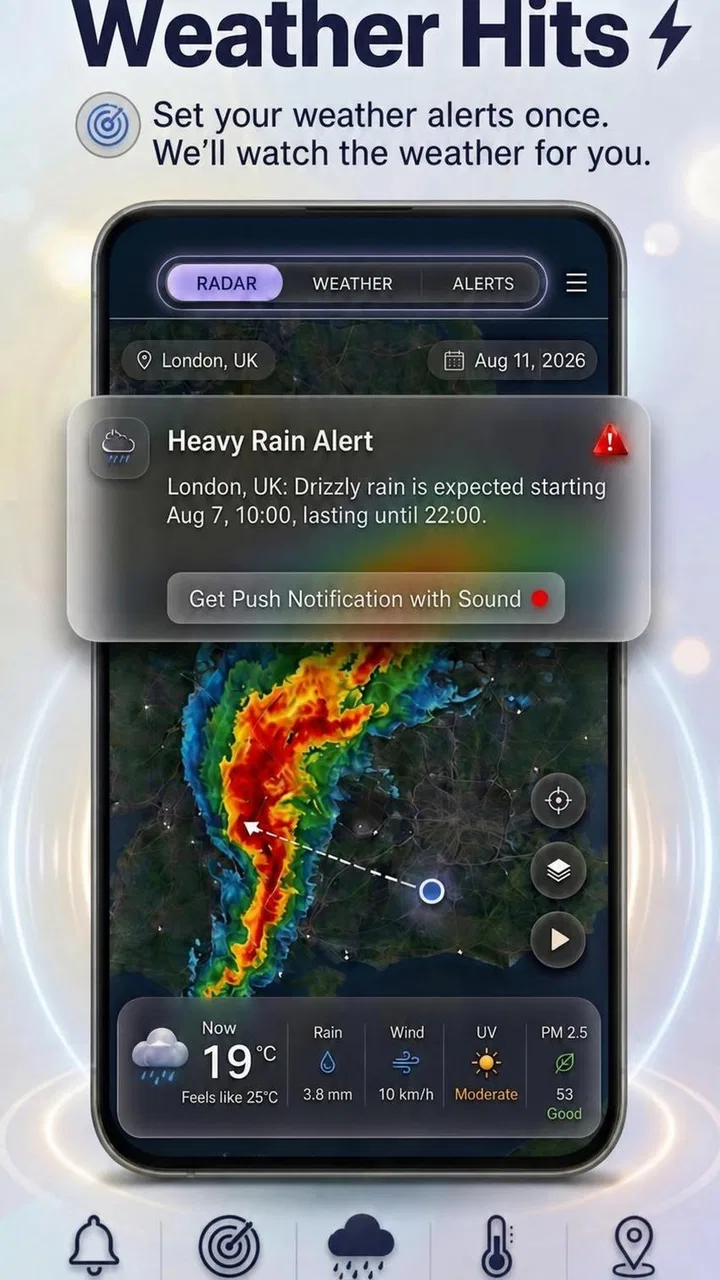
When I try a new weather app, I want to understand its value within a few minutes. Weather Alerts: Radar Tracker is aimed at that exact moment: checking whether changing conditions deserve attention, then looking more closely at the local radar. I found it more focused than a general forecast app, because its main purpose is not to surround me with every possible weather detail. It is built around severe weather alerts, custom notifications, and a radar view that helps connect an alert with what is happening nearby.
That focus makes it appealing if you regularly need to decide whether to leave home, delay a journey, protect outdoor plans, or keep an eye on conditions around family members. It is a free weather app from Weather alerts, rated for Everyone, and it has reached over ten thousand installs. The current release is version 1.1.15, and it works on Android 7.0 or later, so it is accessible even on older compatible phones.
What to expect from Weather Alerts: Radar Tracker
The first thing I would tell a friend is not to treat this as a complete replacement for every weather tool. Its strongest idea is the connection between severe weather notifications and a local radar tracker. A standard weather app may give you a temperature, a daily outlook, and an icon for rain. This app is more useful when the question is, “Is something significant moving toward my area, and should I pay attention now?”
You May Also Like

 Pandora - Music & Podcasts
Pandora’s Music Is Easy to Start, but Harder to Recover
Pandora’s strength is its low-effort path from a seed to a station. Its weak spot is how much confidence it asks you to place in connection, setup, and quiet recovery.

 8 Ball Pool
 Is Built on Rivalries, Rematches, and Routine
A close look at the rivalries, rematches, shared routines, and unanswered safety questions that turn a quick pool match into a persistent mobile community.

 Samsung Music
’s Quiet Strength Is Playing What You Already Own
Its reach comes less from spectacle than from dependable access to a personal library. That simplicity is both the app’s strongest retention engine and its ceiling.

 AccuWeather: Weather Radar
AccuWeather Review: A Quick, Clear Forecast for Everyday Decisions
For everyday plans, the best forecast is the one you can understand quickly. AccuWeather makes rain timing, radar, and local conditions easy to act on, with a few trade-offs.

 Hill Climb Racing
Why Hill Climb Racing Still Turns Crashes Into One More Run
A tiny car, a bumpy hill and one more upgrade: Hill Climb Racing keeps resurfacing because its simple chaos makes every near-miss feel personal.

 AliExpress - Shopping App
AliExpress Makes Global Shopping Feel Personal, but Shoppers Bear the Risk
AliExpress turns a global marketplace into a pocket-sized discovery engine. Its reach is useful, its shopping loop compelling, and its trade-offs easy to miss.
More From Our News Desk
View All News


That distinction matters. A forecast can say rain is possible later, while radar can help me understand whether precipitation is already approaching, passing nearby, or breaking apart. The two views answer different questions. I use the forecast for planning and the radar for immediate context. Weather Alerts: Radar Tracker is most convincing when I want the second kind of information without digging through a crowded weather dashboard.
The app has an average rating of 4.2 from 61 ratings, which suggests a generally positive early response, although I would not treat that as a guarantee that every location will feel equally well served. Weather information can vary by region, and the usefulness of alerts depends heavily on how relevant and timely they are where I live. The developer name, Weather alerts, makes the purpose clear, but the experience still depends on whether the app’s alert coverage matches my local needs.
I also appreciate that the app is free to start. There are in-app purchases ranging from $6.99 to $112.99 per item, so I would pay attention to the purchase screen before committing to anything. For a first-time user, the sensible approach is to install it, understand the basic alert and radar workflow, and decide whether the extra options are worthwhile only after seeing how often the app actually helps.
The kind of user who will benefit most
I see the greatest value for people whose routines are affected by fast-changing weather. That includes commuters who drive through several neighborhoods, parents deciding whether a child’s outdoor activity is sensible, cyclists and runners who need a short window of safer conditions, and anyone responsible for pets, gardens, equipment, or outdoor work. It can also be useful for people who do not want to stare at a forecast all day but would rather receive a notification when conditions deserve a closer look.
The app is less compelling for someone who only wants a simple temperature glance. If all I need is tomorrow’s high and low, a familiar built-in weather widget may be quicker. It is also not the first tool I would choose for detailed long-range planning, climate information, or a broad collection of lifestyle measurements. This app earns its place when alerts and radar are more important than a large catalog of forecast data.
Getting through the first setup without guesswork
After installing it, I would begin with one goal: make the app useful for one real location rather than trying to explore everything at once. Start by checking that the displayed area is the place you actually care about. A weather app can seem inaccurate when it is simply centered on the wrong town, a nearby district, or an old location selected during setup.
Once the local area looks right, I would look for the alert controls before spending time studying the radar. The reason is practical: radar is something I open when I am curious or concerned, while notifications can work in the background of my routine. If the app offers choices for custom weather notifications, I would keep them narrow at first. Too many warnings can turn a useful safety tool into background noise, especially if I receive notices for every minor change.
A good first configuration is based on decisions I genuinely make. For example, if I walk to work, I care about conditions near departure time. If I manage an outdoor event, I care about approaching rain or severe conditions before guests arrive. If I am checking on an elderly relative, I may care more about warnings affecting that person’s area than about the weather where I am standing. Thinking in terms of decisions makes the notification setup more useful than simply enabling every available option.
I would also spend a moment learning the difference between an alert and a radar display. An alert is a prompt to pay attention; it does not replace my own look at the map. The radar is where I can add context, such as whether the weather appears to be moving toward my area or whether the significant activity is staying elsewhere. This small distinction prevents one of the most common mistakes with weather apps: assuming that a notification explains the entire situation by itself.
My recommended first test
Rather than waiting for a serious weather event, I would perform a simple test during an ordinary day. Open the local radar, identify the area around home, and compare what the map suggests with what I can see outside or with the next short period of weather. The point is not to demand perfect precision from one glance. The point is to learn how the app presents movement, location, and intensity so that the screen feels familiar when conditions become more urgent.
Then I would review the notification behavior after using the app for a while. If the notices are too frequent, I would reduce the scope rather than abandoning the app immediately. If they are too quiet for my needs, I would check whether the selected area or notification preferences are responsible. This is one of the most useful habits I found: treat the first setup as a calibration period, not a one-time decision.
Reaching the first meaningful success
The first successful action should be very concrete: use an alert to make a small, sensible change to a real plan. Imagine I am preparing to drive across town for an outdoor appointment. A notification arrives, and I open the app instead of relying only on the message. I check the local radar to see whether the activity is close to my route or concentrated in another direction. If the movement looks relevant, I can leave earlier, carry suitable clothing, move the appointment indoors, or wait before setting out.
That workflow is more valuable than simply opening the app and admiring a map. The alert starts the process, and the radar helps me interpret it. I would not make a major safety decision from a single screen alone, but the combination gives me a faster starting point than repeatedly refreshing a generic forecast.
Another realistic example is a parent deciding whether children should remain at a park. A basic forecast might have looked acceptable earlier in the day, but a new severe weather notification changes the question. I can check the radar, see whether the activity appears to be approaching the local area, and choose to end the outing before the situation becomes uncomfortable. The app does not make the decision for me; it reduces the time needed to gather the relevant context.
For outdoor workers, the useful habit is to check before beginning a task and again when an alert arrives. A radar view can help distinguish a short passing shower from a larger area of activity, while custom notifications reduce the need to keep checking manually. I would still use common sense and local safety guidance, particularly during severe conditions, but this app can serve as an early-warning layer in the routine.
Three details that improve the experience
- Use notifications as triggers, not conclusions. Open the radar after an alert and verify whether the affected area matters to your route, home, or plans.
- Choose notification settings around your schedule. A commuter, gardener, and event organizer need different levels of interruption. A smaller number of relevant notices is usually easier to act on.
- Learn the local map before bad weather arrives. Knowing where your area sits on the radar makes a later warning easier to interpret under pressure.
These habits are not flashy features, but they change how useful the app feels. Many people install a weather app, enable everything, and then stop trusting it after repeated low-value notifications. I would rather begin with one location and one clear use case, then expand only if the app proves helpful.
Common confusion and where the app needs patience
The biggest possible confusion is expecting the radar to behave like a full meteorological explanation. A map can show nearby weather activity, but I still need to interpret distance, direction, timing, and local conditions. A colored area on a screen should not automatically be read as a precise forecast for my front door. I consider the radar a decision aid, not a replacement for judgment or official emergency instructions.
Another point worth understanding is the difference between local relevance and personal convenience. A notification may be important for the selected area but not for the exact place where I am at that moment. Conversely, a fast-moving system can change after I last checked. I would keep the location settings aligned with the places that matter most and avoid assuming that one saved area covers every part of a daily journey.
Notification fatigue is a genuine limitation. Custom alerts sound useful, but customization only helps if I spend time choosing what deserves an interruption. If every possible warning is turned on, the app may become something I dismiss automatically. I prefer to start conservatively, observe how the notices fit my routine, and adjust them after a few days of normal use.
The free entry point is convenient, but the presence of in-app purchases means I would not assume every useful option is included without checking the relevant screen. The listed purchase range is wide, with individual items from $6.99 up to $112.99. That does not automatically make the app poor value, but it does make deliberate evaluation important. I would use the basic experience first and only consider paying if a specific function solves a problem I regularly have.
There is also a practical limitation for people who want one app to cover every weather question. Weather Alerts: Radar Tracker is centered on alerts and radar, so someone looking for extensive forecast history, specialized outdoor metrics, or a highly detailed planning dashboard may prefer a broader weather service. I would use a conventional forecast app alongside it if I needed richer day-by-day planning. The two approaches complement each other rather than competing perfectly.
How it compares with familiar alternatives
Compared with a phone’s default weather app, this one feels more purposeful when I am monitoring changing conditions. The default option is often better for speed and basic forecast information, while Weather Alerts: Radar Tracker makes the alert-to-radar workflow more central. If I already receive reliable warnings elsewhere and rarely inspect radar, the difference may not justify another installation.
Compared with a general weather app that includes radar as one small tab among many, this app may feel easier to understand for a first-time user who mainly wants weather warnings. Its narrower purpose can reduce distraction. The trade-off is that I should not expect the same breadth as a large all-in-one weather platform. I would choose this app for focused monitoring, not because it replaces every other weather screen on my phone.
Compared with manually checking a weather website, the advantage is convenience. A notification can bring attention to a developing situation without requiring a repeated search. The disadvantage is that automated alerts need sensible configuration, and I still need to open the app and think about the local context. In other words, the app saves time at the start of the process, but it does not remove the need for interpretation.
Who should install it and what to do next
I recommend Weather Alerts: Radar Tracker to a first-time user who wants a straightforward way to combine severe weather awareness with a local radar view. It is especially suitable if weather affects travel, outdoor responsibilities, or family plans and if I am willing to spend a few minutes tuning notifications. The free starting point makes it easy to test without immediately treating the app as a permanent part of my routine.
I would skip it if I only need a basic daily forecast, if I strongly dislike notifications, or if I already have a trusted radar-and-alert service that covers the same locations. I would also avoid relying on it as my only source during dangerous conditions. For serious weather, official emergency communications and local guidance should remain more important than any single app.
My next step after installation would be simple: select the location that matters most, enable only the alerts connected to a real decision, and open the radar when the first notification arrives. I would then compare the app’s usefulness with my normal routine rather than judging it from the first screen. If it helps me act earlier without creating unnecessary interruptions, it has earned its place.
Overall, I found the app’s appeal less about having the largest collection of weather information and more about making an important sequence easier: notice a warning, inspect the nearby conditions, and decide what to do. That is a modest but practical goal. For people who want exactly that focused workflow, Weather Alerts: Radar Tracker is worth trying. Its 4.2 average rating reflects a positive reception, but my recommendation is more specific: install it when timely local awareness matters to your day, and configure it carefully so the warnings remain useful rather than noisy.
FAQs for Weather Alerts: Radar Tracker
01What is Weather Alerts: Radar Tracker used for?
Weather Alerts: Radar Tracker is designed to help you monitor current conditions, upcoming forecasts, radar activity, and severe weather notifications in one place. After reviewing the app, its main value is the combination of visual radar maps and alert information, making it useful for planning commutes, outdoor activities, travel, or daily routines when changing weather could become a concern.
02Does Weather Alerts: Radar Tracker provide real-time weather alerts?
The app can provide notifications about significant weather conditions in supported areas, such as storms, heavy rain, strong winds, or other potentially hazardous events. However, alert availability and timing may depend on your location, the data providers used by the app, your notification permissions, and local meteorological coverage. Users should keep notifications enabled and avoid treating the app as a replacement for official emergency instructions.
03Can I use the radar and forecast features without creating an account?
Many of the app’s basic functions, including viewing weather information and exploring radar data, may be available without a full account, depending on the current version and platform. Some personalization features, saved locations, premium tools, or notification settings could require additional setup or a subscription. It is worth checking the sign-in and pricing screens before downloading if account-free access is important to you.
04Is Weather Alerts: Radar Tracker free to download and use?
Weather Alerts: Radar Tracker may be available as a free download, but the overall experience can include advertising, optional in-app purchases, or premium subscription features. These paid options may unlock extra forecasts, advanced radar layers, extended weather data, or an ad-free experience. Before confirming a subscription, review the store listing carefully for billing frequency, trial terms, and cancellation conditions.
05How accurate is the weather information in Weather Alerts: Radar Tracker?
The app’s accuracy depends on the quality, update frequency, and regional coverage of its weather data sources. Radar imagery is particularly helpful for tracking precipitation and storm movement, but forecasts can change quickly, especially during severe weather. In my review, the app is best used as a convenient planning and monitoring tool, while official local weather services should remain the authority for warnings and emergency decisions.
Pros
- Clear radar maps help track approaching rain and storms.
- Timely alerts can warn users about severe weather nearby.
- Location support makes forecasts relevant to current surroundings.
- Useful for planning commutes
- trips
- and outdoor activities.
- Simple interface makes key weather information easy to find.
Cons
- Alert accuracy may vary by region and available weather data.
- Frequent notifications can become distracting during unsettled weather.
- Some advanced radar or forecast tools may require a subscription.
- Radar imagery can use significant mobile data when viewed often.
- Battery usage may increase if location tracking runs continuously.

Weather Alerts: Radar Tracker
Gallery